Get more value from every form
The B2B buying journey is long, and most of your audience isn't ready to buy yet.
According to Professor John Dawes of the Ehrenberg-Bass Institute, only about 5% of your potential buyers are actively in the market at any given time. The other 95% are not in the market at all. (Marketingscience)
That doesn't mean they should be ignored, but that they need to be nurtured and kept warm until they are ready.
Forms, combined with relevant content, are one of the most effective ways to engage both existing and potential customers throughout this journey. Whether it's a newsletter signup, demo request, event registration, or support inquiry, the experience starts here.
A clunky, generic, or off-brand form can undo the trust you've built across dozens of prior interactions. That is why we've made a series of powerful improvements to SuperOffice Forms, designed to help you:
- Collect more relevant and accurate data
- Create professional, on-brand experiences
- Build forms that are easier to use and more flexible
In this article, you'll learn what’s new in SuperOffice Forms and how to get started with the new features.
What’s new in SuperOffice Forms?
Conditional fields (Pilot)
What are conditional fields?
A conditional field is a form field that appears or changes based on a user’s input in another field.
Instead of showing every possible question upfront, the form dynamically adapts.
For example:
- If a user selects “I’m interested in product demo”, new fields like preferred date or company size appear
- If they select “I need support”, those fields are replaced with issue type or priority
In short:
Conditional fields let you show the right questions to the right people at the right time.
Why are conditional fields useful?
Conditional fields help marketers create forms that feel shorter, more relevant, and easier to complete, which often leads to higher conversion rates. At the same time, they make it possible to collect more meaningful information by only asking follow-up questions when they are relevant. This results in better-quality data, stronger lead qualification, and a more personalized follow-up experience. In practice, this means you can gain deeper insights into your leads without adding friction to the form experience.
We would like your feedback!
We will soon run a pilot of this feature, where a limited amount of customers can test it. If you'd like to try the feature and share your feedback, feel free to reach out to catherine.ngo@superoffice.com to sign up.
If you're interested in more pilots, like AI-styling, check out this link.
This is just one of several improvements we’ve made to help you get more out of your forms.
Below you can see five other improvements that we have done to help you create more flexible and user-friendly form-experiences.
1. More fields - more flexible forms
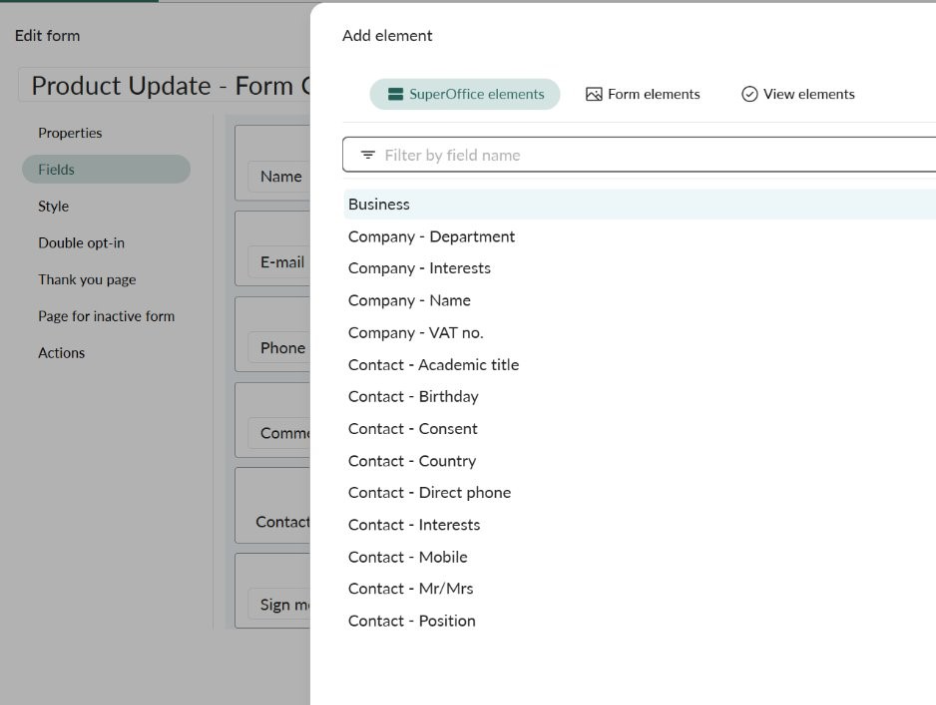
You can now add custom fields (from company and contact persons), access more standard fields directly in the form editor, and search across all available fields when building a form.
Forms are not only about collecting email addresses. Used strategically, they support the full customer journey: from lead generation and event registration to support requests, customer onboarding and surveys. More fields mean you can ask the right questions at the right moment, give your sales and service teams a better context, and capture higher-quality CRM data from day one.
✅ Result: more relevant data, less manual follow-up
Read more about it here.
2. Better admin control = higher data quality
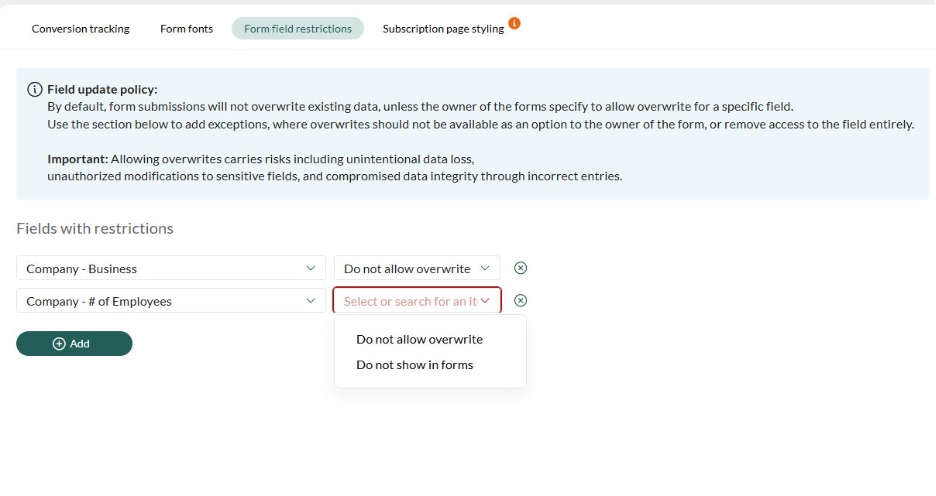
More fields also mean more risk of important information being overwritten by mistake. That's why administrators now have more control over how form submissions update CRM data.
Admins can decide which fields can be overwritten via forms and prevent specific fields from being used in forms at all. This reduces the risk of accidental or incorrect data updates, which is especially valuable when multiple teams are running forms simultaneously.
✅ Result: Flexibility for users, control for admins.
Read more about it here.
3. Improved styling = forms that match your brand
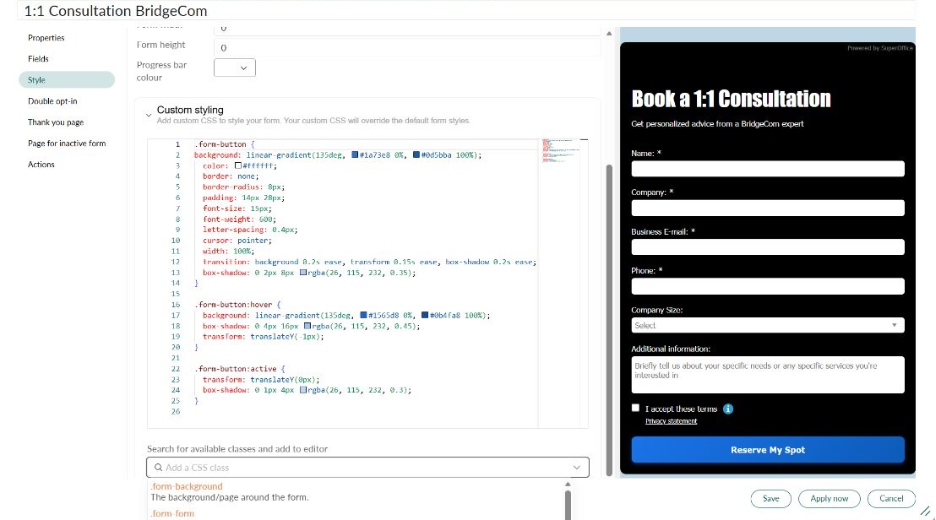
Forms are a customer-facing touchpoint, and they should reflect your brand and website. We've introduced CSS styling for more advanced styling customization.
You can write custom CSS directly, use predefined CSS classes for guided styling, and add effects such as hover states, focus frames, gradients, and backgrounds.
✅ Result: Branded forms that match your website and create a professional, consistent experience across channels.
Read more about it here.
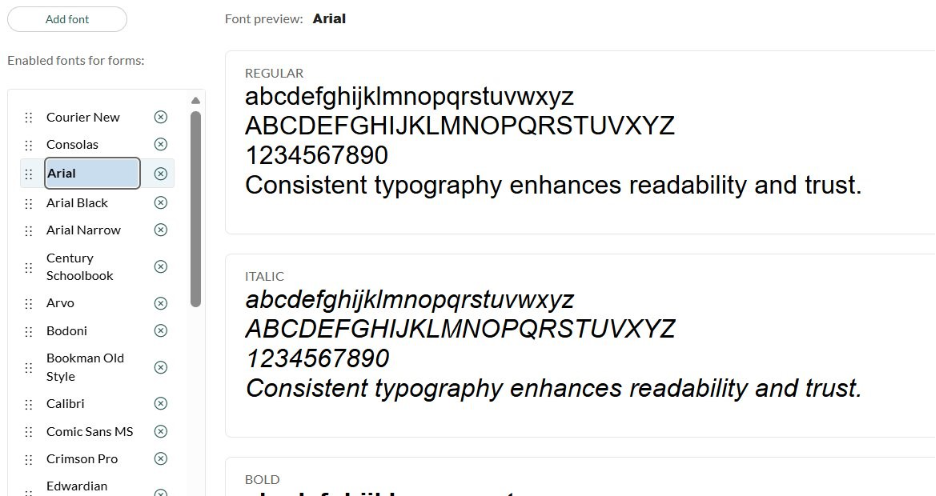
4. Google Fonts for consistent typography
Typography is a core part of brand identity, and it now extends to your forms. Google Fonts are available across all form-related pages in SuperOffice.
You get access to 1,200+ fonts, with search and preview built in. Fonts can be applied to forms, thank-you pages, double opt-in pages, and inactive form pages. Admins can manage the available font list centrally.
✅ Result: A more polished, on-brand experience from first click to confirmation.
5. Subscription page styling
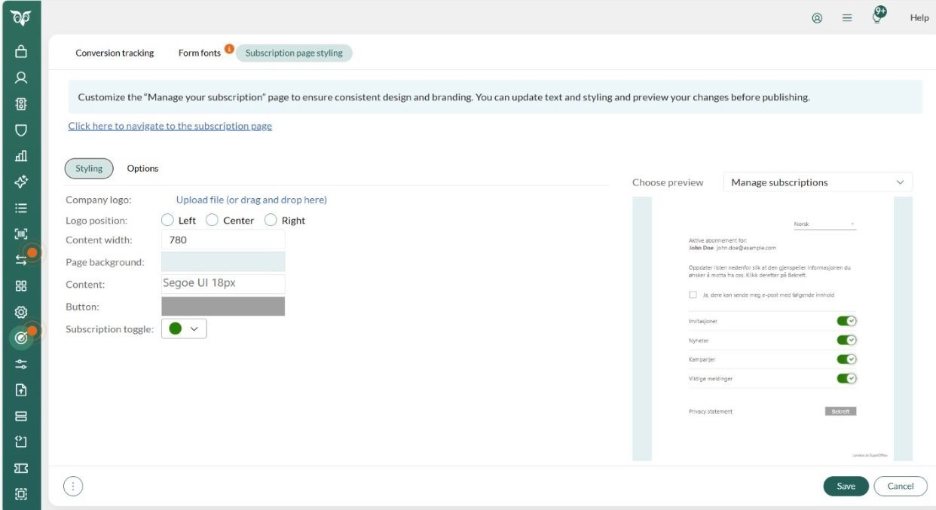
The subscription and unsubscribe page is an important - but often overlooked - touchpoint for trust and compliance.
You can now:
- add your company logo
- adjust styling, as applying brand colors
- Overwrite the standard texts
- preview changes before publishing
✅ Result: A seamless, trustworthy experience at every stage of the customer relationship, also when contacts manage their own preferences.
→ Style your subscription page
Turn small changes into big impact
Small improvements to your forms add up quickly: better user experience, higher conversion rates, more accurate CRM data, and stronger customer relationships from the very first interaction.
All features described in this article are available to SuperOffice customers with a Marketing license.
Fantastic news. Love the styling feature - makes it so much easier to create a good looking, embedded form to your webpage. Also looking forward to having dependent fields in a form 🤗