Find a pilot program to join
Explore versions and features currently in need of pilot testing.
The pilot programs you can join
Right now, you can sign up for the following pilot programs:
(Click an item to see the details)
-
SuperOffice for Teams ⌛ 👥 ☁️
SuperOffice for Teams - Pilot
Save your Microsoft Teams conversations and files straight into SuperOffice – so important customer chats and documents don't get lost.
Pilot start: 2.June, 2026
What is this pilot about?
SuperOffice for Teams connects your Microsoft Teams conversations with your CRM. Instead of searching through channels and chats to find what a customer said last week, you can save the relevant conversation to SuperOffice – right where it belongs.
With SuperOffice for Teams, you can:
- Save messages from 1-on-1 chats and standard channels to SuperOffice.
- Save a single file shared in a standard channel message to SuperOffice.
- Archive a date range of messages – for example, "Yesterday" or "Last 7 days."
- Generate an AI summary of the conversation before saving. Requires AI Labs.
Watch this helpful SuperOffice for Teams Video to learn more.
For full details on setup and supported scenarios, see the SuperOffice for Teams documentation.Who can join?
- SuperOffice CRM Online customers.
- Anyone who talks to customers or partners in Teams and wants that history visible in SuperOffice – sales reps, account managers, support teams, and project teams.
What you need:- Microsoft Teams (desktop or web).
- A SuperOffice Online user account with permission to create activities and documents.
- A Microsoft 365 and a SuperOffice administrator to complete the setup before users can get started.
For full details on supported scenarios and known limitations, see the SuperOffice for Teams documentation.When is the pilot available?
- Pilot start: 2.June, 2026
- Participation: Opt-in, enabled per tenant
- After the pilot: This app is planned to be included in a paid subscription once the pilot ends.
Ready to join?Getting started requires a Microsoft 365 and a SuperOffice administrator. Here's what to do:
- Complete the SuperOffice for Teams pilot form.
- Sign in to the SuperOffice for Teams portal and register your tenant. (We will share the portal link post sign up.)
- Download the app package (.zip file) from the main page on the Portal.
- Upload the app in the Microsoft Teams admin center.
- Grant admin consent so the app can act on behalf of signed-in users.
- Let your users know the pilot is live – they can then install SuperOffice for Teams themselves via Teams.
See Getting started (for administrators) in the documentation for the full steps. User installation steps are covered in Getting started (for users).What feedback are we looking for?
- Whether archiving from the message menu and compose bar feels natural and easy to find.
- Whether the auto-matched contact suggestion saves time.
- Whether the AI summary captures the right information.
- Any compatibility issues or unexpected behavior.
- Anything else that would help us improve SuperOffice for Teams.
Please share your feedback here.After the pilot:
This app is planned to be included in a paid subscription once the pilot ends.
-
Custom Objects ⌛ 👥 ☁️
Introducing Custom Objects to replace Extra fields and Extra tables in Service 🚀
Auto generated archive tabs
When adding a relational field to standard entity or Custom object and enabling “Show one to many relations” this result in archive being automatically added to related standard entity (Company, Contact, Sale, Project, Ticket).
Implementation uses configurable screens framework to add tabs in UI.
SuperOffice Selections
SuperOffice Selections is the key component to get insight to your CRM data and initiate actions against contacts. While users currently can create selections/find data based on Extra fields and Extra tables directly connected to known SuperOffice entities, we now extend search capabilities to search against Extra tables with fields pointing to known SuperOffice entities. Users will therefor not be limited to using SuperOffice Service for creating selections/searching for data any longer.
If any visible Extra table contains field pointing to entity(Company, Contact, Sale, Project, Request, Activity) we include it as a “top” node to select from in selections.
Extending search capabilities on relational fields
Allow for searching across multiple columns. More user friendly: now we include a preview to give user more insight into each entity in results and make it easier to select correct.
Preview details of a Custom Object in the Side Panel
With this feature, you can preview all data from a Custom Object in the Side Panel by selecting preview from the drop-down. This also enables easy navigation to related standard or Custom Objects directly from the Side Panel. Clicking on a standard object will navigate you to that object, while clicking on a custom object link will open a dialog for viewing or editing additional information.
Search/Selection/Dashboard on Custom Object without a relation to a standard entity
You can search directly for your Custom Tables/Custom Objects and save them as selections or create Dashboards. This functionality no longer requires a relation to a standard entity, providing you with search results as a list of items from the Custom Object. You can also use your Custom Objects as criteria in your datasets to visualize them in charts with full drill-down capabilities in standard SuperOffice Dashboards.
Custom Objects Archives in Screen Designer
Customize Archive layout on standard objects containing Custom objects in the Screen Designer.
New Custom Objects modal
New component to show, edit and delete an item from Extra table.
Custom Objects triggers
Create a trigger on loading a Custom object to pre-fill fields based on CRMScripts.
Full Entity in Navigator
Elevate your Custom Objects to full entity status in the Navigator. They'll appear alongside standard SuperOffice entities with complete search, history tracking, and favorites support—plus quick access from the New-icon in the top bar.
Available in Screen Designer
Design Custom Object layouts using the Screen Designer. Control how information displays and assign different layouts per User Group.
Access Rights for each Custom Object
Control Custom Object access with role-based permissions. Assign specific rights (None, Read, Create, Update, Delete) per user role, ensuring team members see only what they need.
When can I join?
The start of the pilot program was April 2024.
Who can join?
Customers who want to sign up need to:
✔️ Use SuperOffice CRM Online
✔️ Use Service: extra table
Effect of enabling the pilot feature:
- All users will join the pilot automatically upon opting in.
- Archives are automatically added to related standard entities.
- SuperOffice Selections gain search capabilities for Extra tables.
- Previews are available for Extra table entities.
- New features and functions released for Custom Objects will be automatically enabled for tenants already participating in this pilot program.
Please note on Auto generated archive tabs: This is based upon settings set for your extra table. You may end up with more tabs than you expect when pilot feature is enabled. You can adjust the settings set for your extra tables or in the configurable screens framework if you have Development Tools license.
Click here to learn more and sign up.
👥= All users will join Pilot
Once you have opted-in - all user will automatically get the pilot-versions we make available.
-
AI Lab ⌛ 👥 ☁️
Introducing AI-enabled features in your CRM system 🚀
🆕Company completion (added October 2025 in version 11.5*)
When adding a new company, AI helps to find the correct company and company information related to this company. This information will be added to the entry and after you have reviewed the information, you can save the new company.
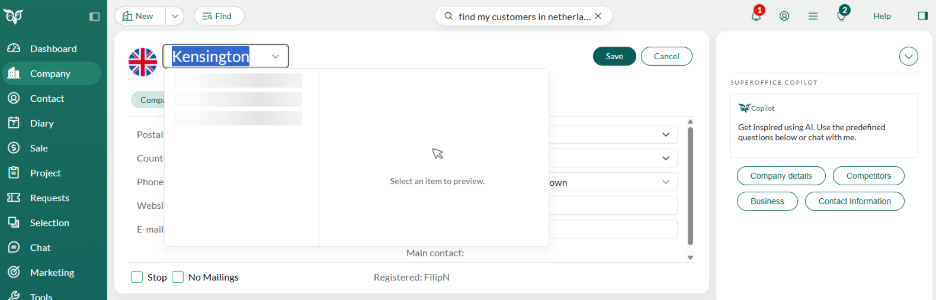
The AI service uses AI search and has access to external sources of information (more will be added in Q4 2025).
Duplicate check
If the company already is in the SuperOffice solution this is indicated with the company icon infront of the company name.
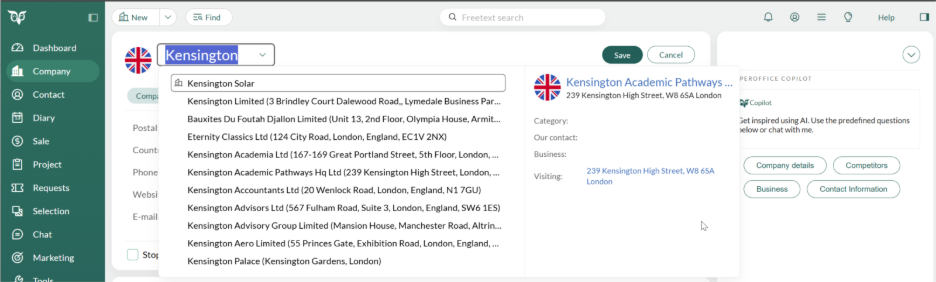
*The new version is rolled out in waves, see release notes
Try out new exciting AI-enabled features in SuperOffice with SuperOffice Copilot.
AI Lab is our new program designed to test out and explore new AI-enabled features.
The first set of features available to try is our SuperOffice Copilot.
SuperOffice Copilot offers AI-enabled features to assist with your everyday tasks.
For example:
👉Get information about your prospects and customers, so you can better gauge what you want to do next or assist with your preparation before having a conversation
👉Get a suggested pitch or proposal when you are stuck and need inspiration or need to get something done fast
👉Get a summary of a request letting you quickly understand the essence of a conversation to help you provide input.
👉Get help when creating text in an appointment or a request helping you do more in less time
👉Get assistance to find and add correct company and company related information when adding a new company to SuperOffice.and more! The applications and uses are many and more will come.
When can I join?
The start of the pilot program was March 2024.
Who can join?
Customers who want to sign up need to:
✔️Use SuperOffice CRM Online
Please note that some of the AI-enabled features may only be available if you also use the latest versions of SuperOffice, such as the latest version of SuperOffice Service, or even are a pilot customer of specific features.
When you toggle this feature on you will automatically accept the terms for SuperOffice AI Lab. To read the terms, click here.Click here to learn more and sign up.
👥= All users will join Pilot
Once you have opted-in - all user will automatically get the pilot-versions we make available.
-
SuperOffice WebTools (for Windows and Mac) 🔃 👤 🏢 ☁️
SuperOffice WebTools is a set of productivity tools for computers running both Windows OS and Mac. This includes document management integration against SuperOffice Web and CRM Online.
The SuperOffice WebTools app is free of charge and covered under the current Terms of Service for your SuperOffice CRM installation.
Sign Up and Download
To sign up as a Pilot Customer, your SuperOffice administrator simply adds your user or your user group to the "Join pilot program" in the preference section. This is done in the SuperOffice Settings and maintenance client;
Open "Settings and maintenance", go to Preferences / Functions / Join pilot program for WebTools
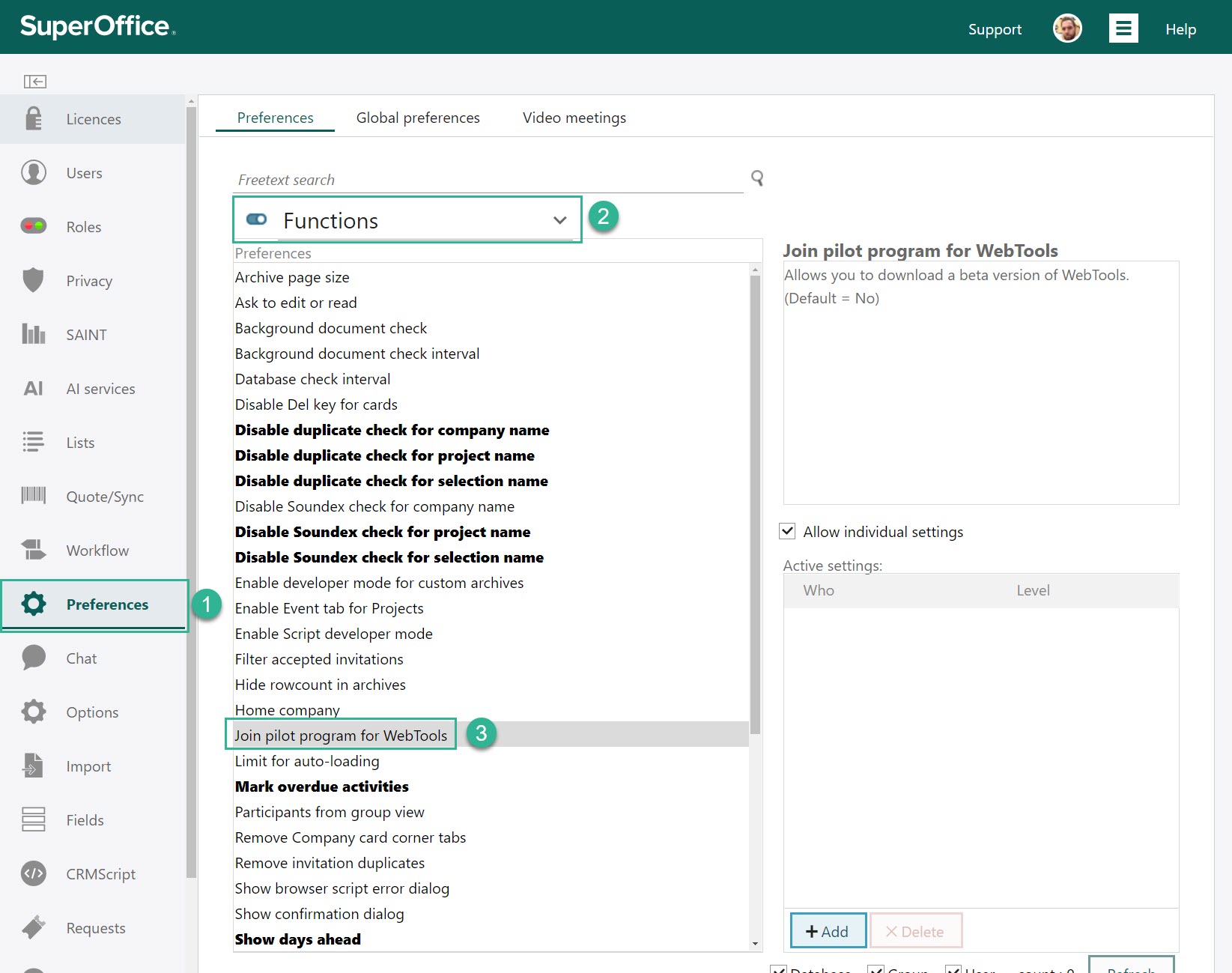
You may add users individually, by user group, or include all users. Click [Save] to add users to the list.
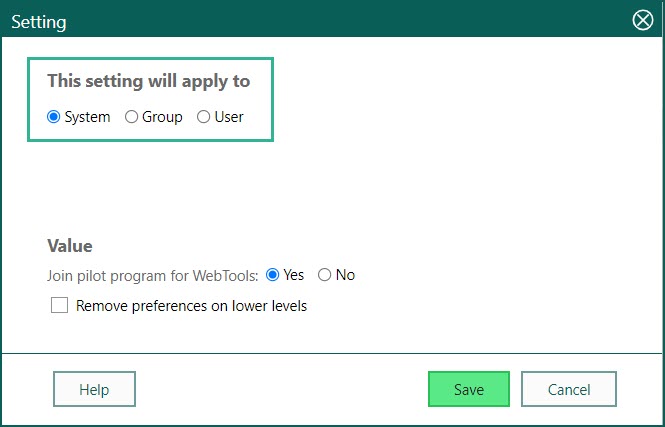
SuperOffice Web will automatically detect new Pilot versions of WebTools and offer the user to update. WebTools can also be downloaded manually from the download menu inside SuperOffice.
Who can join the pilot program?
We are interested in hearing from customers who use:
* Online or SuperOffice OnSite Web 8.5 R06 (or newer incl. 9.x and 10.x)
* Any browser supported by SuperOffice
* Optional: Microsoft Outlook 2007 or newer
* Optional: Lotus Notes 8 or newer
* Mac: OS X 10.10 (Yosemite) or newer
What's in it for you?
By being a Pilot tester you will get a head start and early access to this version. With the new features comes an important update that will provide better and improved overall connection experience.
This Pilot program will be valuable for customers eager to test versions before release, and to get the most up to date versions, as well for SuperOffice - to make sure this version gives the desired results on stability and performance.
-
SuperOffice Mobile CRM 🔃 👤 🏢 ☁️
Work just as effectively on your mobile device as you would if you were in the office. You can book meetings, update your sales pipeline, open and read documents, check the status of projects, follow up sales and manage your sales team – all from your mobile device.
Mobile CRM provides real-time access to your CRM data through an intuitive and user-friendly app that you can use on both your smartphone and your tablet.
This app should come with a warning because you can quickly become addicted to having things this easy. With SuperOffice Mobile CRM you are: always in-touch; always informed; always updated and always available.
SuperOffice Mobile CRM is available for iOS and Android devices and covered under the current Terms of Service for your SuperOffice CRM installation.
Sign Up
The app is in Beta, meaning that it is still in the testing phase. You get the beta-version by opting-in. By clicking the opt-in link and start using the app during its Pilot period, you have by default accepted the Beta Agreement Terms.
To sign up as a Beta user, simply sign up by following the instructions in these forms:
Android - Google Play: https://play.google.com/apps/testing/no.superoffice.mobile
iOS - Apple App Store: https://testflight.apple.com/join/VaSLz5VC
Simply click on the links above to start testing them.
Who can join the Beta?
We are interested in hearing from customers who use:
* Any Online or SuperOffice OnSite 9.1 or newer (incl. 10.x and 11.x)
* Any device with minimum version:
- Android ver 9.0 and newer
- iOS ver 15 and newerWhat's in it for you?
By being a Beta tester you will get a head start and early access to new versions. This Pilot program will be particularly valuable for users to test new features of Mobeil CRM and for SuperOffice - to make sure this version gives the desired results on stability and performance. New features and functions, as well as bug fixes, comes on each release
Key to the icons:
🏢 = OnSite Pilot programs
These pilot programs are available for our Onsite customers. You can join most of them without signing up, but there might require some technical configuration to enable the pilot feature.
☁️ = Online Pilot programs
These pilot programs are available for Online customers. You can join most of them by signing up. Sign up for pilot programs >>
🔃 = Reoccurring Pilot programs you can join without signing up
Some of our products will come with a new version at a more random releases schedule. Some of these releases will have a pilot-period prior to the release. These programs you can test the features without signing up for a SuperOffie pilot program. Once you have opted-in - you will automatically get the pilot-versions we make available.
⌛= Limited time in Pilot
👥= All users will join Pilot
Once you have opted-in - all user will automatically get the pilot-versions we make available.
👤= Only selected users will join Pilot
Only the selected user will automatically get the pilot-version we make available. This can vary from program to program, if this is by configuration or enabled as part of the sign-up process.
You can always see what R&D is working on in the Product Release section on the Community. Log in to also see what future versions are planned and more details on each of them.
Are you ready to try the latest features?
Yes? That’s great! 😃
Signing up is easy. All you need to do is to fill out this form: Sign up for pilot programs >>
When you’ve signed up, we will contact you on how you can get started.
Read more about our Pilot Program here
Do you have any questions?
Write us an email and let us know what you want to ask about, and we will contact you to clarify and agree on the next steps with you.
Get started
Find a pilot program to join
Explore versions and features in need of pilot testing.
Sign up to be a pilot customer
Get pilot programs enabled by filling out this form.
Give feedback on your pilot programs
Register your feedback on programs you are signed up for to impact future development.