Step 1: Configure your privacy lists
Before you can document consent, you need to define the options your company will use. Two lists control this:
- Privacy - Source: where a contact's personal data came from - a web form, an incoming email, a business card, and so on. Add or edit sources to match how your company actually collects data.
- Privacy - Legal basis: the lawful reasons for processing personal data under GDPR (e.g. consent, contract, legitimate interest). You can remove any that don't apply to your business or adjust their descriptions.
*[Video: How to change the privacy lists in SuperOffice CRM - verify this video is still current before republishing]*
Step 2: Set up consent management
Once your lists reflect your policy, use Consent Management to document, for each contact:
- Purpose - what you're using their data for (e.g. Sales and service, E-marketing)
- Legal basis - why you're allowed to store and use it
- Source - where the consent came from
- Who and when - who registered the information, and when
This turns "we probably have permission" into a documented, defensible record - which matters if a contact ever asks how their data is being used, or if you need to demonstrate compliance.
*[Video: How consent management works in SuperOffice CRM — verify this video is still current before republishing]*
Step 3: Set up subscription management
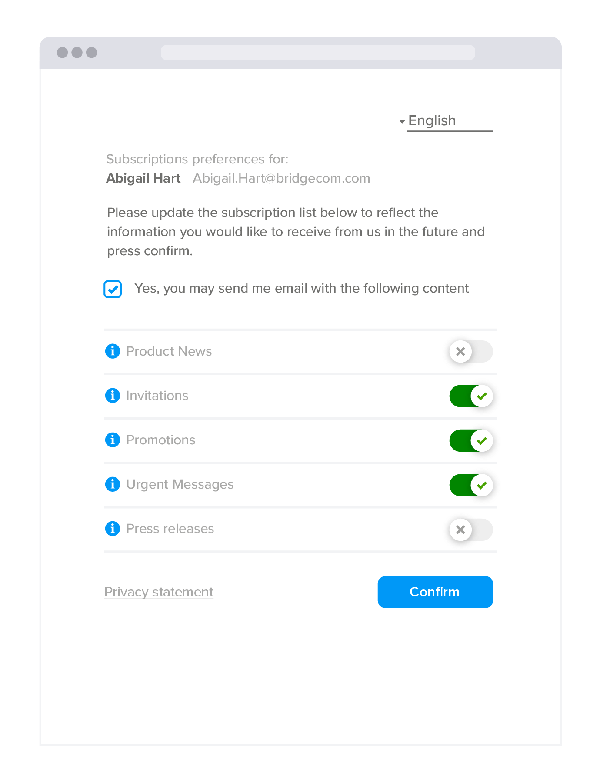
Consent tells you *that* someone agreed to be contacted. Subscription management tells you *what* they want to receive. Set this up so contacts can:
- Choose specific types of content (newsletters, product updates, event invites, etc.)
- Opt out of specific communication types without withdrawing consent entirely
- Update their preferences at any time via a self-service page
This keeps your mailing lists accurate and your unsubscribe/complaint rate lower.

Putting it together
A typical setup, once all three pieces are configured:
- A new contact submits a web form → the source and consent are logged automatically
- Consent Management stores the legal basis and purpose behind that registration
- Subscription Management lets the contact pick exactly what they want to hear from you about
- If they later withdraw consent or unsubscribe, that's reflected instantly — no manual cleanup required
Related reading
- What is GDPR and how does SuperOffice CRM support compliance?
- The 8 GDPR privacy rights and how SuperOffice CRM supports them
- Full documentation: docs.superoffice.com - Privacy & GDPR, including the Manage your privacy settings (GDPR)