Webtools/SuperOffice for Outlook: Time stamp on archive card is incorrect
Status: Solved
Steps to Reproduce
Tested and reproduced in:
SuperOffice CRM Online 11.2 Build Release_11.2_2025.07.02-04 in Chrome.
Pre-conditions:
Use SuperOffice for Outlook or SuperOffice Webtools.
1. Archive an e-mail to SuperOffice CRM.
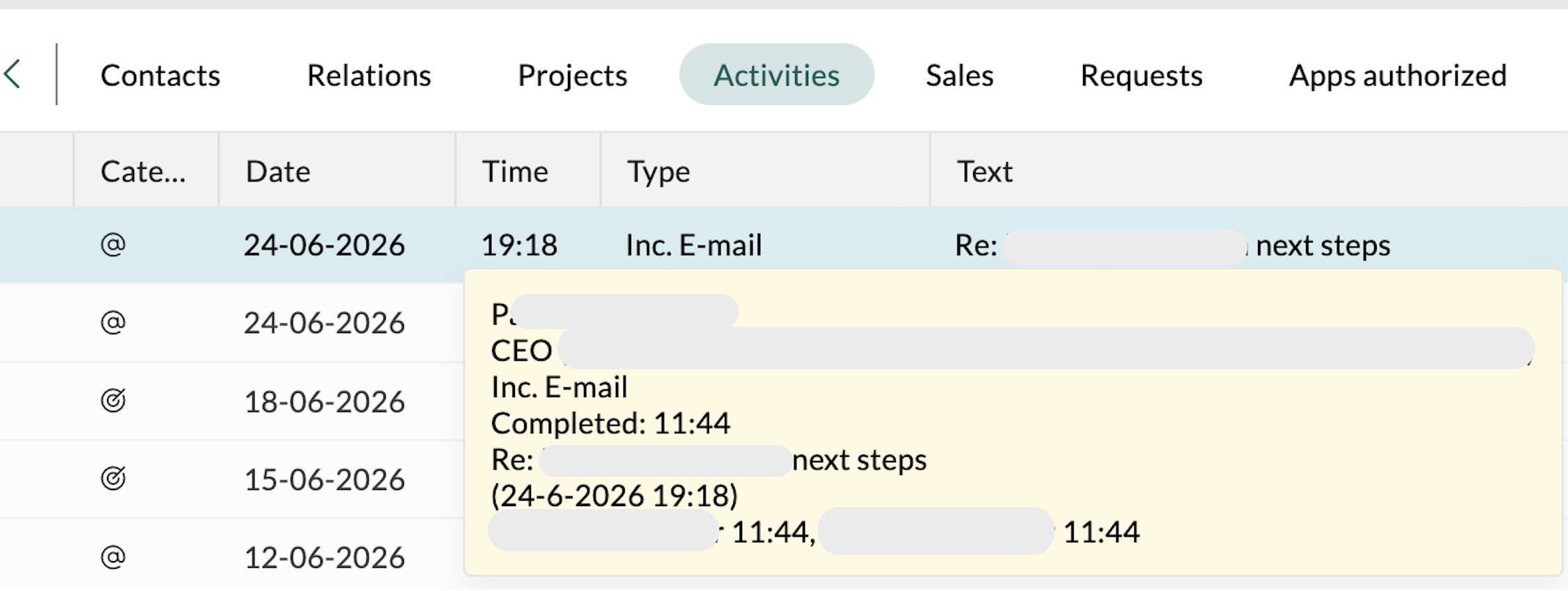
2. Go to company activities, find the archived e-mail > add 'Time' column and hover over the archived e-mail.
Expected result: 'Time' column would show archiving time or last updated time.
Actual result: displays sometimes random time in the past or the future.
info
Please log in to comment.
Details
| Issue id | 79917 |
| Registered | 18 Jul 2025 |
| Last modified | 9 Sep 2026 |
| Severity | Medium |
| Area | WebTools for Windows |
| Status | Solved |
| Target release | |
| Type | Bug |
Comments
[2025.11.06: doman]
same happens with requests
[2026.06.25: andre]
Thank you for reporting this.
Based on your example, the behavior you’re seeing is expected.
![]()
I added another image to the bug to explain the exact behavior. See above (if the second will show after the next system sync)
The email was originally received in Outlook on 24‑06‑2026 at 19:18, and this is the date used when the email is stored as a document in SuperOffice.
The timestamp 11:44 reflects the moment the email was archived in SuperOffice. On the same day, the tooltip may only show the time, but from the following day onward, it will display the full date and time (e.g. 25‑06‑2026 at 11:44).
As this aligns with the intended behavior, this is not considered a bug and the issue will be closed.
Please reach out to ourr Support Team if you have any questions. Thank you!