Wish: Language of automatically sent confirmation e-mail to be the language of the newly entered contact person instead of the associate`s preferred language
Status: Solved
Steps to Reproduce
Currently, the automatically sent confirmation mail (after the user has been entered) is sent depending on the preferred language of the logged in user.
The language should (according to GDPR) be in the language of the recipient.
If preferred (user-) language is set
- is it a language possible to map to one of the SO document language (16 languages)?
- if yes - is template translated to this SO language?
If yes: use it
If no:
Check language for the contacts country - there should always be only 1 default language per country for all countries.
- is it possible to map to one of the SO document language (16 languages)?
- if yes - is template translated to this SO language?
If yes: use it
If no:
Use todays chain of events:
- Preferred document language for logged in user if specified
- If not, language selected in session by logged in user
If no logged in user, the system user (ejsys) will use the English template (online).
CountryLanguage table must be checked and updated if needed (Helene)
PrivacyConfimationMail is translated to A and B languages. C languages can be added in admin.
Solution should be implemented for all the following except "Import".
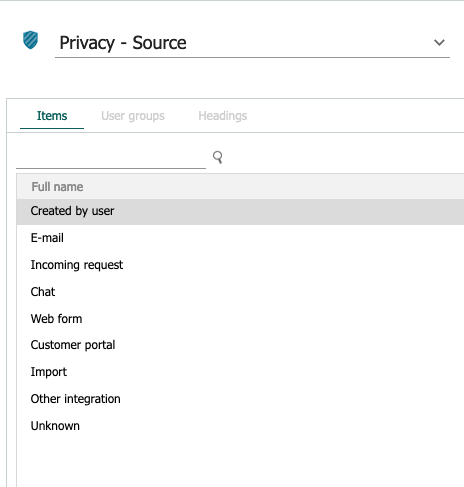
For test:
- Check preferred user language
- Verify what happens when no user languages are specified in Service (should continue with checking Contact country)
- Verify what happens when preferred user language is something that cannot be mapped to any known language (should continue with checking Contact country)
- Verify what happens when preferred user language is a language with different language codes in Service and Sales (have a developer go through all the mappings between Service and Sales to verify they are correct) Verify a couple of them to see they map correctly and that email is sent with correct language
- Verify what happens when preferred user language is something that maps to a known Sales language but for which there is no translated template (should continue with checking Contact country)
- Verify what happens when preferred user language is something that maps to a known Sales language and for which there IS a translated language : the email should be sent using this template
2. Check language for the contacts country
- Verify what happens when the country does not map to any of the A, B or C languages in Sales (ie Botswana) (should continue with alternative 3)
- Verify what happens when the country maps to a C language in Sales (ie China) and when there is no translated template for this language (should continue with alternative 3)
- Verify what happens when the country maps to a C language in Sales (ie China) and when there IS a translated template for this language: email should be sent using this template
- Verify what happens when the country maps to a A or B language in Sales : email should be sent using this template
- have a developer go through the country table verifying that all countries only have ONE default language
3. Use todays chain of events:
If the contact is created by a logged in user:
- Verify what happens if no preferred doc language is set for the user ( go to 4)
- Verify what happens if a preferred doc language is set, but there is no template for it (go to 4)
- Verify what happens if a preferred doc language is set, and there IS a template for it
- verify what happens if there is no template for this language
- verify what happens if there IS a template
If no logged in user, the system user (ejsys) will use the country/language of the owner company in db.
- verify what happens if there is no template for this language
- verify what happens if there IS a template
See above for Privacy - Source list, verify all scenarios.
| country | abbrev2 | englishName | nativeName |
| Czech Republic | cs | Czech | Czech |
| Denmark | da | Danish | Danish |
| Germany | de | German | German |
| United States/United kingdom | en | English | English |
| Spain | es | Spanish | Spanish |
| Finland | fi | Finnish | Finnish |
| France | fr | French | French |
| Italy | it | Italian | Italian |
| Japan | ja | Japanese | Japanese |
| Netherlands | nl | Dutch | Dutch |
| Norway | nb | Norwegian Bokmal | Norwegian Bokmal |
| Poland | pl | Polish | Polish |
| Russia | ru | Russian | Russian |
| Sweden | sv | Swedish | Swedish |
| Ukraine | uk | Ukrainian | Ukrainian |
| China | zh | Chinese | Chinese |
| Switzerland | de | German | German |
Details
| Issue id | 8548 |
| Registered | 28 Mar 2018 |
| Last modified | 12 Oct 2021 |
| Severity | Red Alert |
| Area | Sales |
| Status | Solved |
| Target release | CRM Online 9.2 - R7 |
| Released date | 30 Mar 2021 |
| Type | Bug |
Comments
[2018.05.08: r]
The wish should sound '... to be the document language (new field of a person) of the newly entered person instead of ...
[2018.05.08: MARCE]
Automatic emails should generally be the language of the person, NOT in the (main) language of the country. Person country is useless for multi language companies (e.g. Phoenix) and countries like Switzerland
[2018.07.02: per]
Prevents us from using the automatic GDPR send out function. Problems is valid for both Multiple language countries like Switzerland and Belgium, but also a problem for countries that does not have any of the available system languages provided like Hungary, Estonia, etc.
[2019.07.09: maren]
Prevents an uncomplicated form processing of multilingual forms, since the final data protection confirmation mail is sent in the language of my personal user settings.
In order to be able to use the language functionality of the template "Confirmation - Person added" for the data protection confirmation mail at all, I have to change my personal language setting before processing our English or Czech forms. Therefore we cannot use Czech at all, because I do not speak this language.
In an internationally oriented system like SuperOffice, international customers should actually be recognized via the country and not via my language setting.
Please change as soon as possible, so that the smooth use of the DSGVO functionalities - as advertised by SuperOffice - can finally be used!
Best regards
[2020.06.17: rinow]
News an this one? Customers are crying for this problem to be solved.
In Switzerland we speak up to 4 languages (German, French, Italiano & English). If you register a new customer, SuO is sending out the mail in your personal language. So if you have an English speaking customer, you have to log out and change your default language to English, log in again and then adding the new customer. And this is an NO GO! We are talking about things like “R” Relationship to your customers. So the first thing that a new contact in your system will get is a message not in your personal language! The first thing I would ask myself is – are they really taking care about me? They know that I speak English and now they send me the mail in German? This is a bad start and a bad first impression….!