New in SuperOffice CRM
New AI capabilities across SuperOffice CRM Suite
AI that does the admin work, so you can do the relationships.
AI right into your CRM
AI is changing what a CRM can do, and everyone is racing to keep up. We're taking a different approach: instead of one big AI platform, we're building several focused AI capabilities right into your CRM Suite, each one aimed at a specific piece of admin that eats your day. Built to scale with your business needs, the AI capabilities grow with the Suite plans.
The goal isn't to automate everything. It's to automate the parts that get in the way of your customer relationships, so you can spend your time where it matters most: with your customers.
What's new
Several new and powerful AI capabilities, rolling out across the CRM Suite. Here's an overview of what's new, and what it means:
Company Insight
Registering the wrong company, or spending time double-checking one, is admin nobody has time for. Company Insight autofills the company card straight from official business registries, so you get the right entity, first time, with no manual copy-paste. Available now
Reply Assist
A blank page slows down every service reply, and copy-pasting CRM details into a generic AI chat is slower still, and easy to get wrong. Reply Assist drafts a tailored reply straight from your own CRM data: web pages, templates, FAQs, and past requests. So replies stay fast, consistent, and dependably on-brand, even on a busy day. Available now
Lead Agent
Manual prospecting eats hours reps could spend with customers, and it's easy to miss the leads you never went looking for. Lead Agent works in the background, researching and qualifying new leads against your ideal customer profile, and proposes the ones worth your time. Coming soon
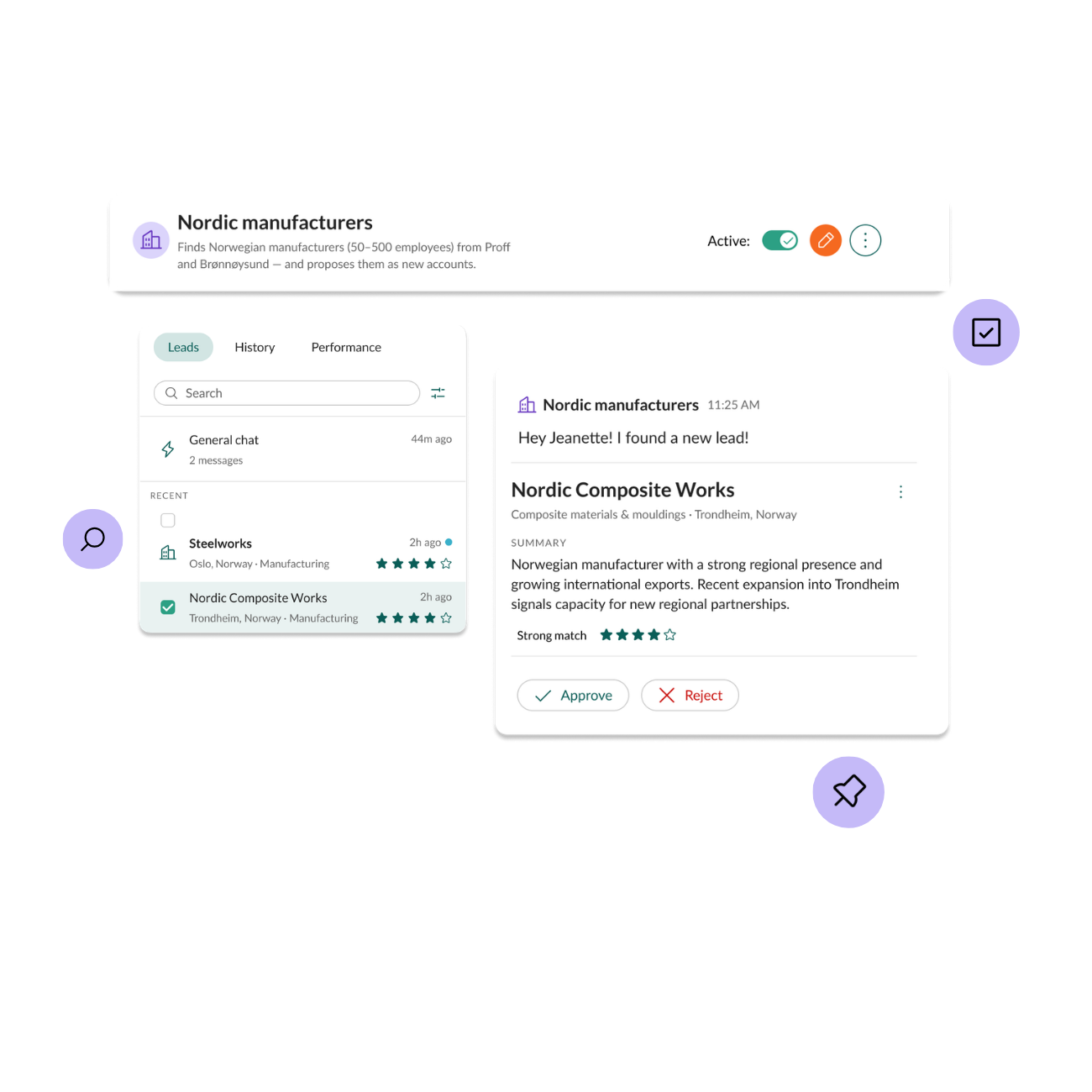
Sales Assistant Agent
Deals go quiet without anyone noticing, and keeping track of every stage yourself is a job on its own. Sales Assistant Agent watches your pipeline and flags what needs attention, so deals don't go cold unnoticed. Coming soon
Data Quality Agent(s)
Duplicates, gaps, and stale records erode confidence in every report built on them. Data Quality Agent(s) finds duplicate companies and proposes merges, and enriches your records with fresh data from the web. Coming soon
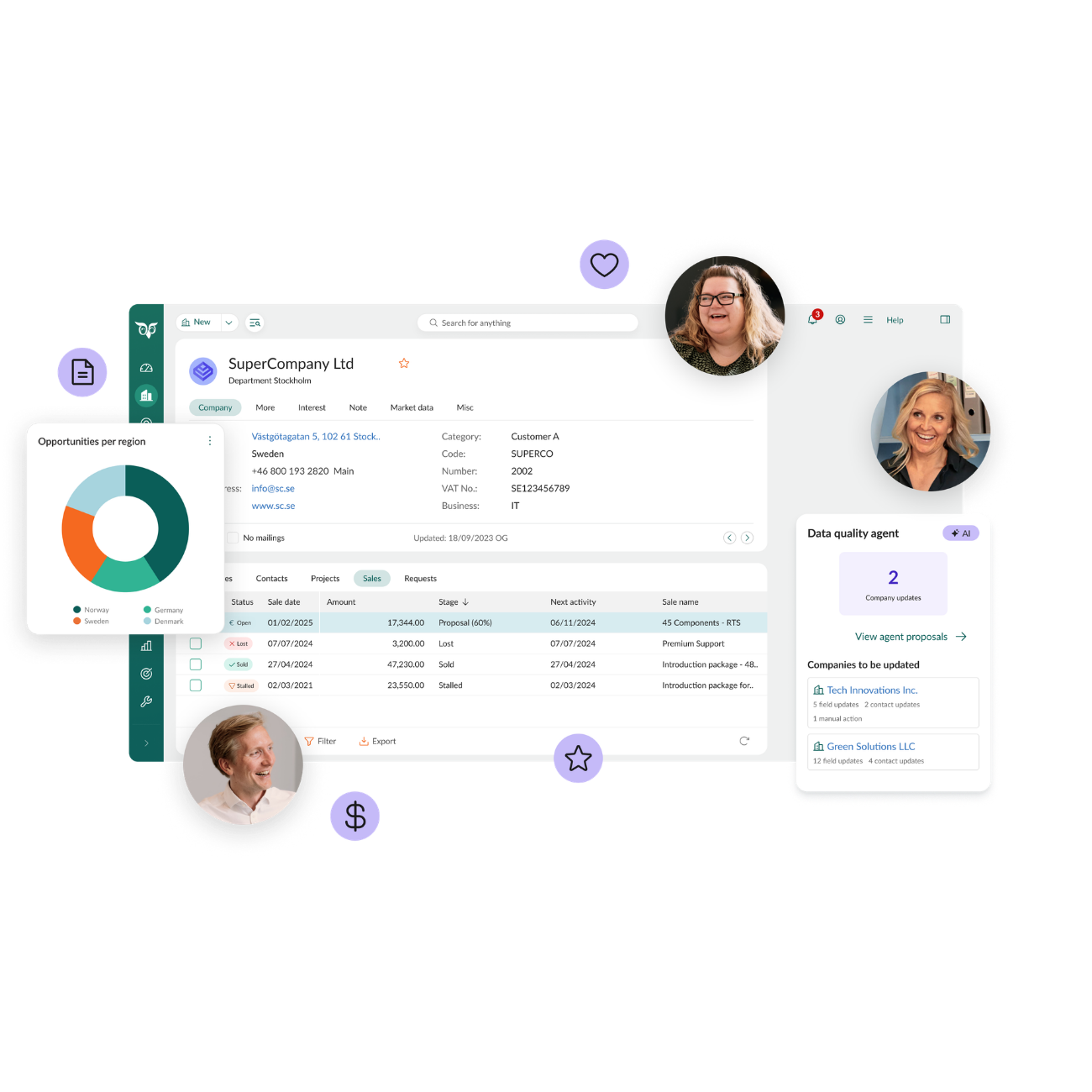
MCP Connect
Copy-pasting data into a generic AI chat is slow, error-prone, and only as good as what you remembered to include, and being tied to one AI tool means starting over elsewhere. MCP Connect makes SuperOffice a live data source for the AI tools you already use, like Claude, Microsoft Copilot, or ChatGPT. In practice: ask Claude for this month's open deals, and it answers straight from your live CRM data, no copy-paste required.
Comes in two levels: MCP Connect (Plus Suite) lets your AI tool read your CRM data, while MCP Connect+ (Super Suite) lets it write back too. So it can log a call or update a deal, not just look one up. Coming soon
SuperNotes
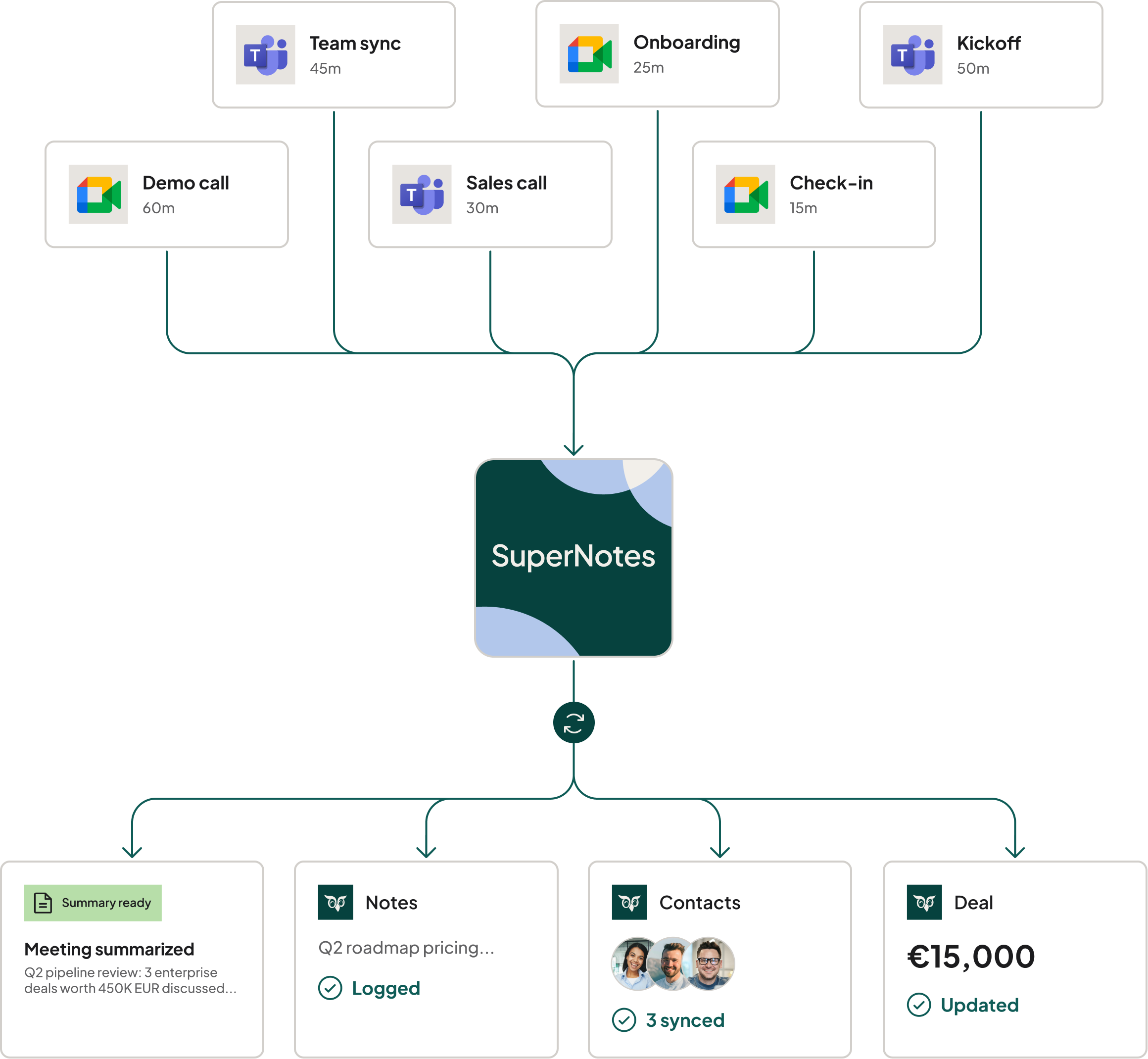
Walking into a meeting without context, or spending the next hour writing it all up afterward, is time you don't get back. SuperNotes gets you ready before a meeting, captures it as it happens, and turns it into a structured summary in your CRM, so every meeting builds on the last. Available now
AI across your CRM Suite plan
Every CRM Suite plan includes AI, and each plan builds on the one before it, so Plus includes everything in Growth, Growth includes everything in Core, and so on.
Starter
✓Writing Assist
Core
Everything in Starter, plus:
✓Workspace Assist
✓Request Insight
✓Summary Assist
✓Translation Assist
✓Card Assist
Growth
Everything in Core, plus:
✓Company Insight
✓Category Insight
✓Forms Assist
✓Data Quality Agent(s)
Plus
Everything in Growth, plus:
✓Reply Assist
✓MCP Connect (read-only)
✓Lead Agent
✓Sales Assistant Agent
Super
Everything in Plus, plus:
✓MCP Connect+ (read and write back)
SuperNotes is a per-user add-on available on top of any CRM Suite plan. Explore SuperNotes for pricing.
See all the AI capabilities in the CRM Suite
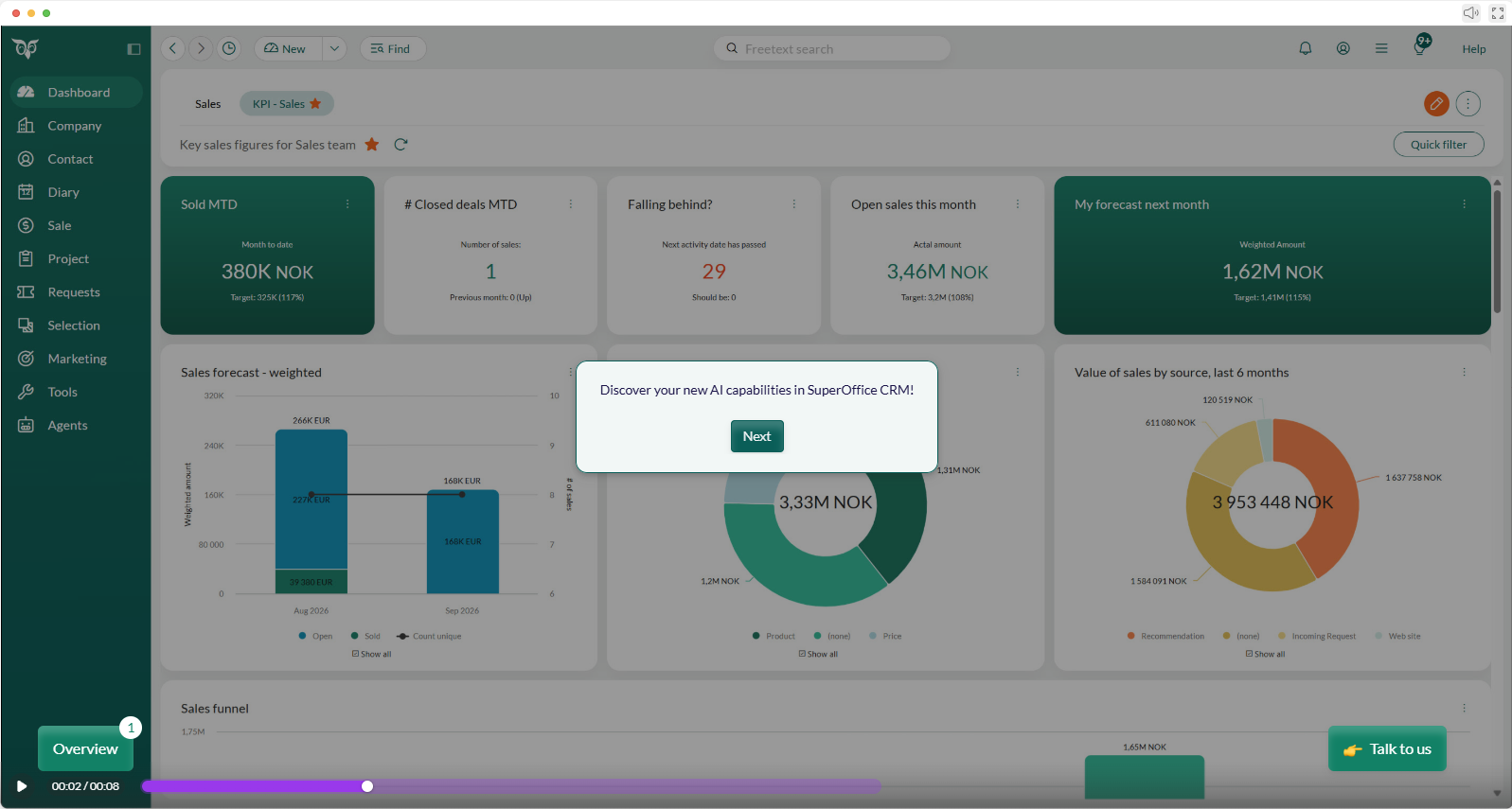
Watch a walkthrough of all the AI capabilities in action, from prospecting to closing to service delivery.
Which AI capability is right for you?
Pick your role, then the challenge that sounds most like your day.
Sales rep
Drafting emails takes too long
Writing Assist drafts outreach and follow-ups in your voice, so you can send them faster. Available now, starting from Starter.
Missing deal context before calls
Card Assist brings the key contact and company details into view before you pick up the phone. Available now, starting from Core.
Prospect records are incomplete
Company Insight autofills the company card from official business registries, so you get the right company, first time. Available now, starting from Growth.
Finding and qualifying leads by hand
Lead Agent researches and qualifies new leads against your ideal customer profile, and proposes the ones worth your time. Coming soon, starting from Plus.
Your AI tool can't update the CRM
MCP Connect+ lets Claude, Microsoft Copilot, or ChatGPT log calls and update deals in SuperOffice, not just look them up. Coming soon in Super.
Account manager
Preparing call briefs takes time
Writing Assist drafts talking points and call agendas, so prep takes minutes instead of an hour. Available now, starting from Starter.
Hunting for account history slows prep
Workspace Assist summarizes account context and history at a glance. Available now, starting from Core.
Account cards are missing key data
Company Insight fills in the gaps straight from official business registries, with no manual copy-paste. Available now, starting from Growth.
Accounts stall without clear next steps
Sales Assistant Agent flags deals that are behind or missing steps, and tells you what to do next. Coming soon, starting from Plus.
Account analysis happens outside the CRM
MCP Connect+ lets your AI tool analyze live account data and write updates back to SuperOffice. Coming soon in Super.
Service agent
Drafting responses from scratch
Writing Assist drafts a first response, so you start from something instead of a blank page. Available now, starting from Starter.
Long request histories are hard to follow
Summary Assist condenses long request threads into a short summary you can read in seconds. Available now, starting from Core.
Simple requests fill up the queue
Forms Assist helps you build forms that guide customers to the right answer before they need to ask. Available now, starting from Growth.
A blank page for every reply
Reply Assist drafts a tailored reply from your own CRM data: templates, FAQs, documents, and past requests. Available now, starting from Plus.
Service data is stuck inside the CRM
MCP Connect+ lets your AI tool read requests and log updates back to SuperOffice. Coming soon in Super.
Sales ops or CRM admin
Writing CRM guides and playbooks
Writing Assist drafts playbooks and admin guides, so documentation keeps up with your processes. Available now, starting from Starter.
Card completeness audits are manual
Card Assist points out missing company and contact fields, so gaps get filled as you go. Available now, starting from Core.
Duplicates and stale records erode trust
Data Quality Agent(s) finds duplicate companies, proposes merges, and enriches records with fresh data from the web. Coming soon, starting from Growth.
Reporting relies on manual exports
MCP Connect gives your AI tool live CRM data for reporting and analysis, with no exports or copy-paste. Coming soon, starting from Plus.
Keeping records current across tools
MCP Connect+ lets your AI tool write updates back, so the CRM stays current without manual re-entry. Coming soon in Super.
Account team
Writing up meeting notes
Writing Assist drafts meeting recaps and follow-up agendas, so the team stays aligned. Available now, starting from Starter.
Long email threads need condensing
Summary Assist turns long email threads into a short summary anyone on the team can pick up. Available now, starting from Core.
Post-call follow-ups are slow to capture
Forms Assist helps you capture next steps and action items in a structured way. Available now, starting from Growth.
Customer questions pile up after meetings
Reply Assist drafts the reply from your own CRM data, so follow-ups stay fast and consistent. Available now, starting from Plus.
Sharing account data with external tools
MCP Connect+ lets the AI tools your team already uses read and update account data in SuperOffice. Coming soon in Super.
AI power user
Switching to a separate AI tool to write
Writing Assist brings AI writing help right into SuperOffice, where your customer data already lives. Available now, starting from Starter.
Asking AI questions without context
Workspace Assist answers questions right inside the CRM, based on what you're working on. Available now, starting from Core.
AI answers are only as good as your data
Company Insight keeps company data complete and accurate, straight from official business registries. Available now, starting from Growth.
Copy-pasting CRM data into AI chats
MCP Connect gives Claude, Microsoft Copilot, or ChatGPT live CRM data on demand. Coming soon, starting from Plus.
AI tools can't write back to SuperOffice
MCP Connect+ lets your AI tool log activity and update records directly in SuperOffice. Coming soon in Super.
Benefits to expect
Less admin, more relationship time. Prospecting, data entry, and "what should I do next?" get handled in the background.
More business growth, sooner. Lead Agent finds and qualifies prospects you'd otherwise miss, Sales Assistant Agent keeps deals from stalling, and cleaner data from Data Quality Agent(s) means fewer wasted outreach efforts. Together, that's a fuller pipeline and a faster path from lead to revenue.
Data you can actually trust. Fewer duplicates, fewer gaps, cleaner reports.
Freedom to use the AI tools you already have. MCP Connect brings your CRM data to Claude, Copilot, or ChatGPT, so you're never locked into one AI source.
Every meeting builds on the last. SuperNotes carries context forward, so you never walk into a meeting cold.
A human always stays in the loop. Every agent proposes an action; you decide whether to approve it.
See the full picture
From system of record to system of action. Explore how it all comes together.
Learn more
"It's so easy!"
Lasse, Lyskomponenter.no, after trying MCP Connect in pilot
AI at every stage of the customer relationship
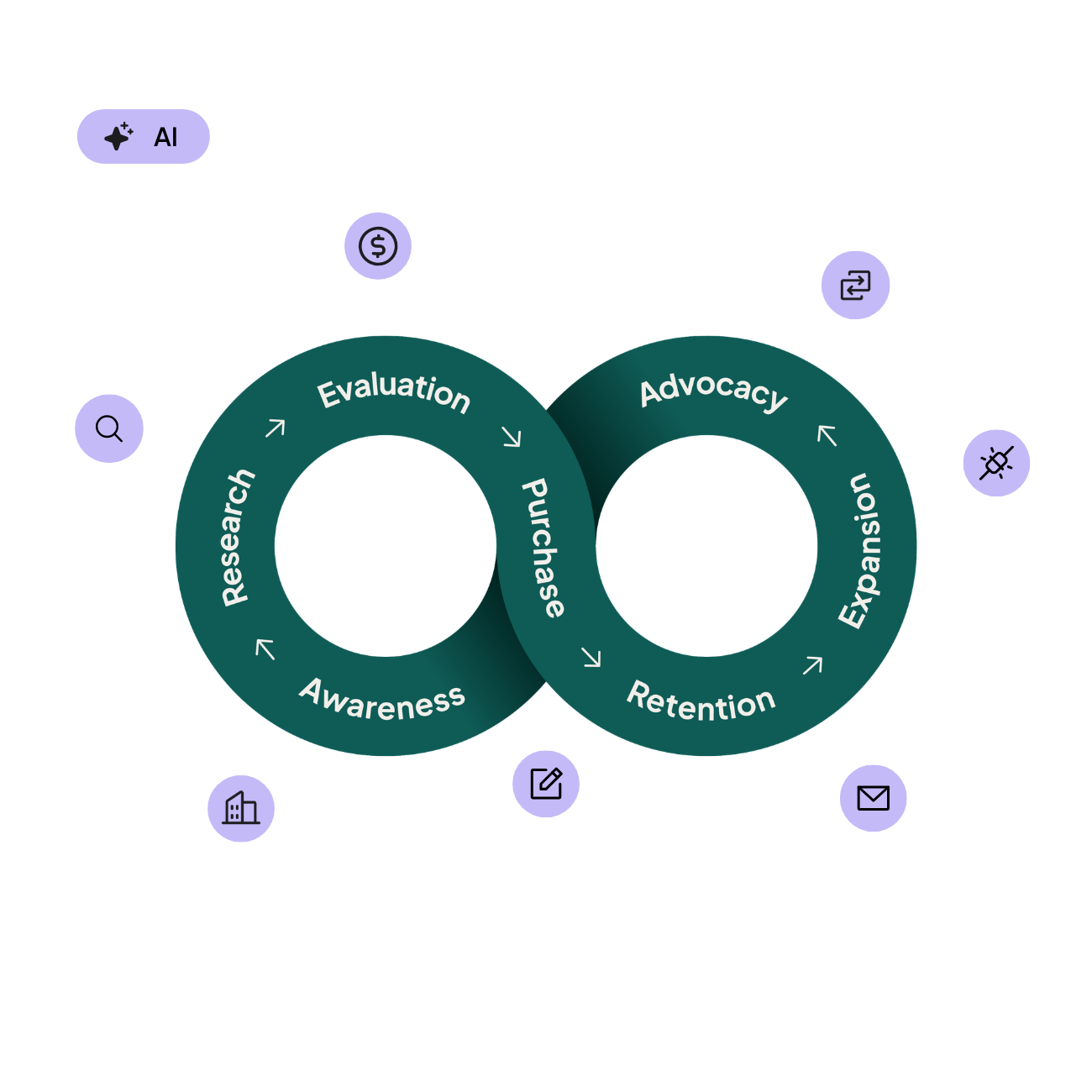
Customers don't live in silos, they move through a loop: awareness, research, evaluation, purchase, retention, expansion, advocacy, and around again. Each capability sits at a specific point in that loop, not off in its own silo.
Lead Agent finds the prospect at awareness and research. Company Insight adds them cleanly once they're in. Sales Assistant Agent keeps the deal moving through purchase. SuperNotes gets you ready to walk into that first meeting, right at the purchase-to-retention handoff, and Reply Assist keeps them satisfied once they're a customer. Underneath all of it, Data Quality Agent(s) and MCP Connect work at every stage.
One keeping your data honest, the other making sure whatever AI tool you use can act on it, wherever you are in the loop.
Built with a human touch
AI should support people, not replace them. That's why every one of these capabilities keeps a person in control of the outcome, whether that's approving a new lead, sending a service reply, or merging a duplicate record.
We've spent 35 years looking after customer relationships, and just as long protecting the data behind them. Everything here runs on GDPR-safe, EU-based data storage, built to the same standard you already trust us for.
How the AI works: what it's built on
Every capability draws on a trustworthy, visible set of sources.
Lead Agent
Public sources you select, checked against your country's business registry by default: Brønnøysundregistrene for Norway, Northdata for Germany, and so on.
Company Insight
The same as Lead Agent, plus your country's business registry and web search.
Data Quality Agent(s)
The same business registry as Lead Agent, plus the company's own website. Shows exactly which source backs every suggested update.
Sales Assistant Agent
The baseline you select: SuperOffice's sales guide, past won deals (by rep, team, or the whole org), or your own playbook.
Reply Assist
Only your own CRM content: requests, FAQ entries, reply templates, documents, and optionally web content.
MCP Connect
Reads directly from your live CRM data: companies, contacts, appointments, sales, projects, and requests. Nothing copied or cached anywhere else.
SuperNotes
Your own meetings, captured from Teams or Google Meet. Never used to train public AI models, and never shared outside your CRM.
Getting started
Check your CRM Suite plan. The plan overview above shows exactly which AI capabilities are included for you today, and what's still to come.
Try what's live now. Company Insight and Reply Assist are available today. No setup needed, just open your CRM.
Watch your inbox. Over the next few weeks, we'll send out emails with guidance for the new capabilities.
Consider SuperNotes. If meetings are a big part of your day, explore SuperNotes as an add-on to your plan.
Want more? We can fix that! Your AI capabilities scale with your needs, so talk to your SuperOffice contact person about upgrading your plan.
FAQ
Will these AI capabilities replace my sales, service, or marketing team?
No. Every capability is designed to remove admin work, not decisions. A person always reviews and approves the output before it goes anywhere.
Is my data safe?
Yes. Your data stays in the EU and is handled under GDPR, the same standard we've always held for your CRM data. This includes SuperNotes. Your meeting data is never used to train public AI models.
What does it cost?
Take a look at the plan overview above to see which AI capabilities are included in each CRM Suite plan. From there, pricing and availability depends on which plan you're on. See our pricing page for a guiding overview, or talk to your SuperOffice contact person for a specific answer.
Is SuperNotes included in my CRM Suite plan?
No, SuperNotes is sold separately, per user, on top of any CRM Suite plan. A short trial is available if you'd like to test it first. Read more about SuperNotes here.
What's the difference between MCP Connect and MCP Connect+?
MCP Connect, included in Plus, lets your AI tool read your live CRM data. MCP Connect+, included in Super, adds write-back. So your AI tool can also log activity or update records, not just look them up.
Do I need a specific AI tool to use MCP Connect?
MCP Connect works with Claude, Microsoft Copilot, and ChatGPT. You don't have to switch tools. SuperOffice simply becomes a live data source for the one you already use.
Relationships that matter. Revenue that grows.