CRM Suite Super
Run an enterprise-grade sales team to grow your business
At enterprise scale, your CRM has to keep up.
Your sales, marketing, and service teams share the same customers, the same goals, and increasingly, the same need to work smarter, and not in silos. SuperOffice CRM Suite is built around that reality. One connected platform covering the entire Relationship Loop. From finding and winning new business, to growing accounts, to taking care of customers every step of the way.
More is now included as standard in your CRM. Your plan gives you a wider range of capabilities across sales, marketing, and service, plus powerful AI capabilities embedded directly in the CRM to help your teams work faster, follow up smarter, and spend less time on manual tasks.
The result: more value from what you already have, without changing your CRM setup.
Large teams run on predictable performance. Super gives you deep sales insight, deal velocity, engagement frequency, and win/loss history across the sales cycle, unlimited sales targets, AI reply suggestions, and data mirroring for resilience, so you can run a modern commercial process at full scale, across the entire relationship loop.
Start from where you are today
Super replaces the Premium plans. Open your current plan to see exactly what's added, and what stays the same.
I'm coming from Marketing Premium ▾
What stays: your marketing flows, mailings, forms, and segmentation all keep working. Some usage, like the number of mailings you send, now runs on generous built-in allowances, so most teams won't notice a change. Here's what gets added:
I'm coming from Sales Premium ▾
What stays: your pipeline, targets, forecasting, and documents all keep working. Some usage now runs on generous built-in allowances, so most teams won't notice a change. Here's what gets added:
I'm coming from Service Premium ▾
What stays: your requests, queues, SLAs, and customer history all keep working. Some usage, like the number of requests resolved, now runs on generous built-in allowances, so most teams won't notice a change. Here's what gets added:
What should you explore first?
Pick your role, then your biggest challenge right now, and we'll point you to the part of Super worth opening first.
Sales ▾
What's your biggest challenge right now?
I can't tell which regions will hit target until it's too late ▾
Our goals don't reflect how differently each market actually runs ▾
A system outage during quarter-end would be catastrophic for us ▾
We're only using the CRM for sales right now ▾
Marketing ▾
What's your biggest challenge right now?
Campaign performance means something different in every market ▾
We plan campaigns reactively instead of seeing what's coming ▾
Company data needs to be reliable across every region we run in ▾
Customer Service ▾
What's your biggest challenge right now?
Service quality is inconsistent across our regional teams ▾
A regional outage would mean losing access to case history ▾
Each region measures service success differently ▾
Consulting ▾
What's your biggest challenge right now?
Client data has to be available no matter which office is down ▾
Every practice area needs its own version of success ▾
We can't predict which engagements are actually at risk ▾
Product ▾
What's your biggest challenge right now?
We can't predict which feature requests will actually matter at scale ▾
Product data needs to survive a regional outage without disruption ▾
Connecting product systems to AI tools is still ad hoc at our size ▾
IT and Systems ▾
What's your biggest challenge right now?
A single point of failure could take down the whole business ▾
Every region wants its own AI integrations, and volume keeps climbing ▾
We need KPIs that mean something across wildly different teams ▾
Finance and HR ▾
What's your biggest challenge right now?
Financial data has to be available even through a system failure ▾
Every business unit reports against different numbers ▾
Forecasting resourcing needs across regions is mostly guesswork ▾
Learning and Development ▾
What's your biggest challenge right now?
New hires need to understand enterprise-scale AI, not just the basics ▾
Training has to work the same whether someone's in one office or ten ▾
It's hard to set meaningful goals for a globally distributed team ▾
CRM Administrator / Operations ▾
What's your biggest challenge right now?
One outage anywhere could take down the whole operation ▾
AI integration requests are multiplying faster than we can standardize them ▾
Every business unit needs its own KPIs without breaking the reporting model ▾
Management / Leadership ▾
What's your biggest challenge right now?
I need to see risk before it becomes a missed quarter, across every region ▾
Every business unit measures success differently, and I need it to still add up ▾
A major outage during a critical period isn't an acceptable risk for us ▾
Partner / Consultant ▾
What's your biggest challenge right now?
Predicting which partner relationships are at risk is guesswork ▾
Every partner needs their own KPIs, but I need to compare them fairly ▾
Data has to stay available even if a partner's system goes down ▾
Other ▾
What's your biggest challenge right now?
I'm not sure enterprise-scale features apply to how we actually work ▾
Resilience feels like an IT problem, not something I should think about ▾
I want to see what "unlimited" actually means in practice ▾
Six things in Super you'll actually use
Not a feature list. These are the changes our customers notice in their first month, open each one to see why it matters.
Faster, smarter ticket resolution ▾
Automated marketing flows ▾
Reply Assist ▾
Sales targets and goals ▾
ERP connectivity ▾
Unlimited sales targets ▾
Sales forecasting on product level ▾
Everything in Core and Growth, included ▾
AI built for action
In Super, AI works proactively across service, sales, and marketing, on your terms, with your customer data, inside SuperOffice. Let the AI in your CRM help you with the next move.
Writing Assist
Draft emails, notes, and follow-ups in seconds, then edit to make them your own.
StartPage
Your personalized CRM homepage, with the information and shortcuts most relevant to your day.
Workspace Assist
Chat with your CRM. Ask questions about your data and get answers and smart summaries, without leaving your flow. A side panel with your own custom prompts is coming soon.
Request Insight
Understand the sentiment behind incoming requests instantly, and prioritize the customer who needs you first.
Summary Assist
Long email threads and request histories, summarized so you can act in seconds, not scroll for minutes.
Translation Assist
Customer writes in any language. You read it in yours. And answer back.
Card Assist
Scan a business card, get a complete contact in SuperOffice. The fair-end of the trade show just got useful.
Company Insight
Add a company and let AI do the rest, details pulled in automatically from external sources.
Category Insight
Incoming requests categorized automatically, so cases reach the right team faster and more consistently.
Data Quality Agents
An always-on agent that monitors your CRM data and suggests updates, adding missing details and removing duplicates, so your team works with fresh data and less admin.
Smart Form Designer
Describe the form you need, and AI builds it, styled to match your brand, ready to drop onto a page or send by email.
Reply Assist
AI-suggested replies to incoming requests, so your team responds faster, more consistently, and with less effort.
MCP Connect+
Link SuperOffice to the tools you already use, making your CRM the AI-powered hub of your business, with expanded connections built for enterprise scale.
Lead Agent
Never miss an opportunity. AI identifies and suggests leads based on customer input, so your team knows where to focus next.
Sales Assistant Agent
AI suggests the next best action at every stage, keeping deals moving and opportunities from slipping through.
SuperNotes
Prepares for and joins your meetings, takes the notes, and updates the CRM, automatically.
Apps that extend your CRM
Connect SuperOffice to the tools you already use. Some apps are included in CRM Suite plans, others are free for everyone. Select an app to see what it does for you.
Which included apps you get depends on your plan, see the price list or app store for details.
Activity folders for SuperOffice▾
Organize your SuperOffice CRM activities, to-do's and documents in folders.
ActivityBoard▾
Get a better overview and control of your projects with a Kanban board in SuperOffice CRM.
Book My Calendar▾
Book My Calendar gives your customers access to your SuperOffice CRM calendar so they can book time with you quickly and efficiently, without the back-and-forth of finding a slot. Meetings get arranged faster, and every booking lands in your calendar automatically.
ConnectERP for Business NXT▾
ConnectERP gives you a live link between SuperOffice CRM and Visma Business NXT, so account, order, and invoice data flows between the two systems automatically instead of being re-keyed by hand. Your sales and finance teams work from the same numbers, which means fewer errors, no duplicate entry, and faster answers for customers.
ConnectERP for Fortnox▾
ConnectERP gives you a live link between SuperOffice CRM and Fortnox, keeping prices, products, and customer data in sync across CRM and accounting without manual updates. You can quote with confidence on current prices and spend far less time reconciling two systems.
ConnectERP for Tripletex▾
ConnectERP gives you a live link between SuperOffice CRM and Tripletex, making customer, order, and invoice data available directly in CRM and keeping it current automatically. Everyone sees the same financial picture right next to the relationship, so nobody has to switch tools to check status.
ConnectERP for Visma Net▾
ConnectERP gives you a live link between SuperOffice CRM and Visma Net, with live access to ERP data inside CRM and no exporting, importing, or re-typing between systems. The result is less admin and more accurate customer conversations, grounded in real order history.
Contract Manager▾
Contract Manager helps you stay on top of every contract with central management and automated reminders, so renewal dates and obligations never slip through the cracks. You keep control of commitments and never miss a deadline that matters to a customer.
Custom App▾
Custom App lets you build your own customizations and integrations using SuperOffice Development Tools, so you can tailor SuperOffice to the processes that are specific to your business rather than bending your business to the tool. You get a CRM that fits how your team actually works, with room to extend it as you grow.
Map4You Pro▾
Map4You Pro visualizes your SuperOffice CRM data on Google Maps, so you can see where your customers and prospects actually are. Planning routes, territories, and visits becomes far more effective when your pipeline is laid out geographically.
Synchronizer for SuperOffice▾
Synchronizer keeps a two-way sync between SuperOffice and your Microsoft Outlook or Google calendar, so appointments and calendar items stay aligned across both systems automatically. That means no double-booking and no double entry, and every customer meeting is logged without you thinking about it.
Google Workspace Integration▾
Google Workspace Integration connects SuperOffice with Google Workspace document management, so you can work on documents in Google while keeping them tied to the right customer in CRM. You collaborate seamlessly without ever losing the link between a document and the relationship it belongs to.
SharePoint Documents▾
SharePoint Documents brings Microsoft SharePoint document collaboration and sharing into SuperOffice, so you can store and co-edit documents in SharePoint while reaching them straight from the customer record. The result is effective collaboration and a single source of truth for every customer document.
SuperOffice for Outlook▾
SuperOffice for Outlook connects your Microsoft Outlook inbox with SuperOffice, letting you archive emails and see CRM context on your contacts without leaving Outlook. Your inbox and your CRM finally tell the same story, fully and seamlessly synchronized.
SuperOffice for Teams▾
SuperOffice for Teams archives your Microsoft Teams chats into SuperOffice, capturing conversations that happen in Teams against the right customer automatically. Nothing important gets lost in chat, because the full customer history lives in one place.
SuperOffice Gmail Link▾
SuperOffice Gmail Link lets you archive emails and capture contact details straight from your Google Gmail inbox into SuperOffice, so you can add contacts and log correspondence without copy-pasting into CRM. That means less manual entry and a CRM that stays complete and up to date.
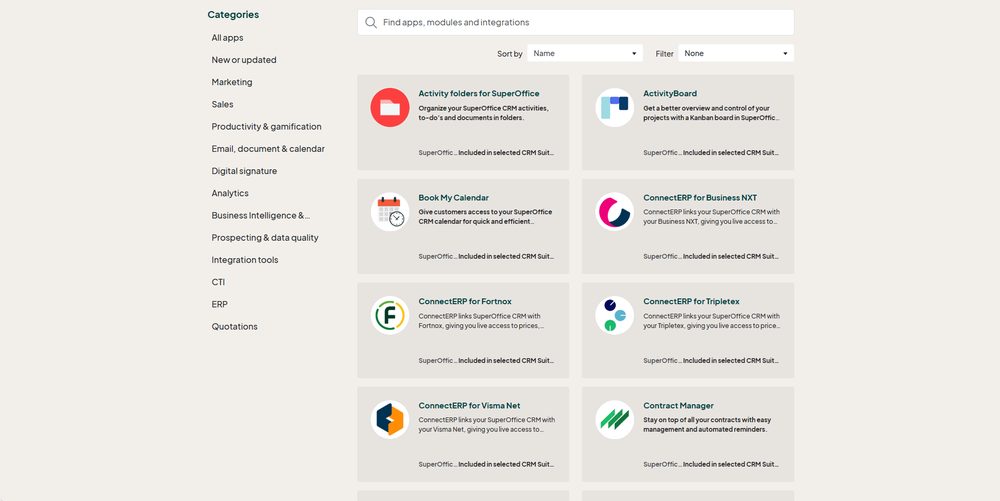
Explore the CRM Suite apps by category in the SuperOffice App Store.
How to add an app to your SuperOffice CRM
Not an administrator? You can still help things along, share the app page with your SuperOffice administrator so they can activate it, or ask your SuperOffice contact to set it up for you.
Need help? Your SuperOffice contact or the Customer Experience Center can walk you through it.
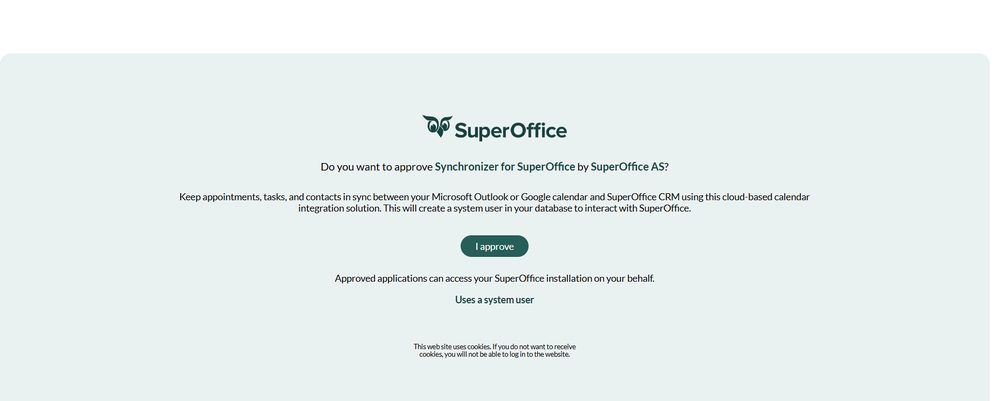
An administrator approves the app.
Pricing
For some customers the subscription price will be adjusted, reflecting the wider capabilities now included. Here's how the model works, and why you stay in control of it.
One plan instead of separate modules
Sales, service, and marketing capabilities that were previously priced as separate premium modules are now in one Super plan. Before you compare prices, compare what's inside: the fair comparison isn't Super vs. your old module. It's Super vs. your old module plus everything you'd have added to match it.
Your subscription fee will stay the same from October 1 until your next renewal date, giving you time to experience the new value with the old price.
Usage that grows when you do
Super includes generous built-in allowances for things like mailings sent and requests resolved. You don't pre-commit to usage you can't predict. If a busy quarter pushes you over, you scale then, not before.
Illustration. See the CRM Suite price list for your plan's exact allowances.
Questions about pricing? The Customer Experience Center is happy to help.
Questions you might have
We bought a marketing tool. Do we really need sales and service too? ▾
Will I pay more? ▾
What is usage-based pricing, and can it surprise me? ▾
Do I have to do anything? ▾
What if Super is more than we need? ▾
Next steps
Now
Explore what's in Super. Read the articles available on what's included, and get to know the new capabilities waiting.
Move
Your account moves to the Suite. New capabilities switch on.
In coming weeks
Pay attention to your inbox for a coming Suite welcome email with more information about your Suite plan. Remember to also check your spam folder.
In coming months
We will keep sending you emails with tips for how to get the most out of your Suite. If you are not receiving the emails and would like to, contact us.
Your next renewal
Subscription price changes on your renewal date after October 1. Until then: new value, old price.
Questions? We're here to help.
Whether it's pricing, features, or whether Super is the right fit, we're here to walk you through it.